

libecodsdk, the JSON-RPC API is used by the EMV Core logs and is very useful during integration debugging.
Protocol rules
Syntax rules
All commands follow these formatting conventions:- All commands and events use the JSON-RPC 2.0 protocol with named parameters.
- All commands and events require a response, except
log()andReaderMessageEvent(), which have noid. - Message format:
- Use a different
idfor each command (e.g., a running counter) to aid synchronization. - An illegal command returns a
"Not existing command"response from the EMV Core.
Send & receive
Sending a message:- Send the JSON-RPC message.
- Wait for the JSON-RPC response.
- Once data starts arriving, wait for a complete JSON (all parentheses closed), or a 1-second timeout.
- Wait for incoming data.
- Once data starts arriving, wait for complete JSON, or a 1-second timeout.
- Parse and process the message as JSON-RPC.
- Send a JSON-RPC response (no response needed for
ReaderMessageEvent; no response is sent forsocket_data_received).
Payment flow
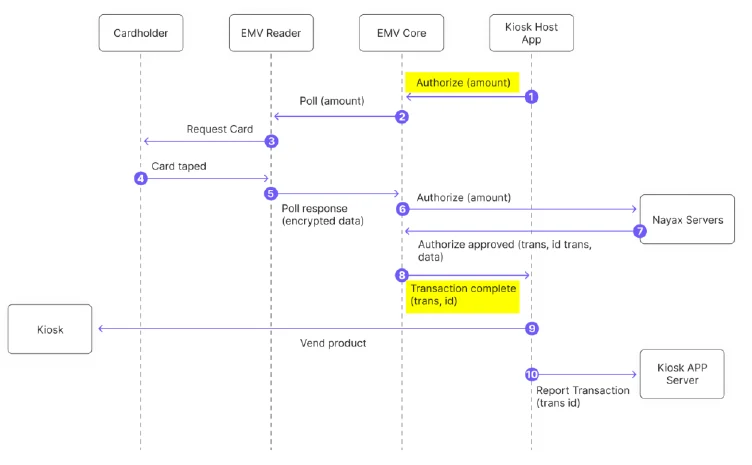
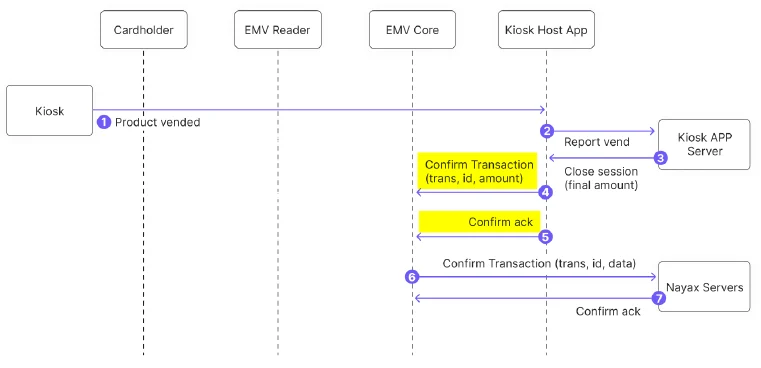
A typical payment session follows this sequence:- POS sends
PreAuthorize. - EMV Core responds (after card tap and authorization) with
TransactionComplete. - POS sends either
ConfirmTransaction(product delivered) orVoidTransaction(otherwise). - POS may send
CancelTransactionat any time;TransactionCompletewill return with statusCancelled.
- Always close a
PreAuthorizesession with Confirm or Void/Cancel. An unclosed session will be reversed by the processor after some time, which may incur higher fees. - Once
ConfirmTransactionhas been acknowledged by the EMV Core, do not re-send it. - To force synchronous processing, set
PAYMENT_SVC_SYNCHRONOUS=1.
Closed loop (CLP) flow
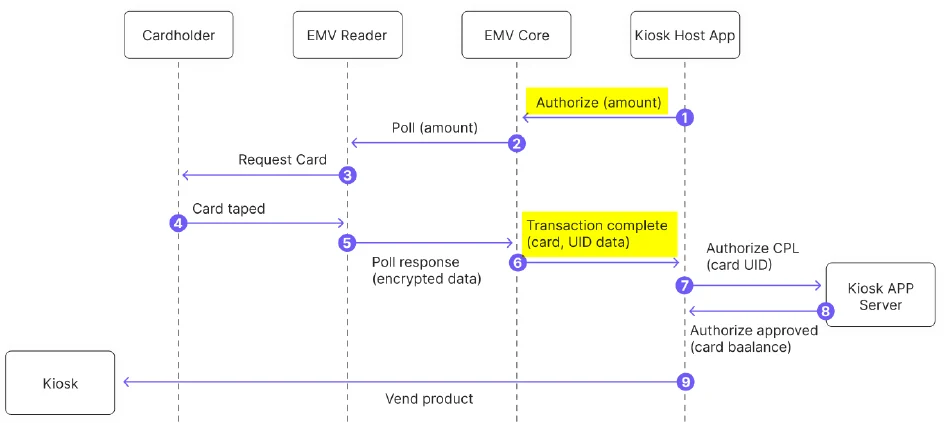
For pre-paid cards, EMV Core immediately returns the card UID to the host application viaTransactionComplete without sending to the Nayax server.
Commands
PreAuthorize
Pre-authorize a card with the payment processor. The EMV Core waits for a card, reads it, processes it, then sendsTransactionComplete.
Example:
ConfirmTransaction
Confirms the pre-authorization so the payment can settle. Example:VoidTransaction
Void a transaction in two cases:- Transaction was pre-authorized but not confirmed, to release reserved funds.
- Transaction was completed but needs to be canceled (e.g., product not vended).
VoidTransaction does not return an event. Check voided transaction status in TMS by searching for Cancel and Cancel Declined statuses.
CancelTransaction
Cancels the last transaction started byPreAuthorize:
- Card not yet presented: Stops the reader poll sequence. The display shows “Cancelling”; the host application must update the display.
- Card already presented but not completed: Returns
CannotCancel.TransactionCompletearrives after the online authorization result. - Transaction already completed: Returns
NoTransaction. - For
CannotCancelorNoTransaction, useVoidTransactionto undo a successful transaction. - If
TransactionCompletereturnsDecline, noVoidTransactionis needed.
GetCardToken
Returns a card token without performing a payment transaction. ReturnsCardTokenReceived event.
- For payment cards: returns a base64 card token.
- For CLP (e.g., Mifare) cards: returns the card UID.
Notes:
- Requires tag
DFA155added to the reader’s Clear results tag list. - CLP card UID is returned only when
CLP_MIFARE_ENABLED=2.
GetStatus
Returns the current EMV Core status. Example:{NotReady, Ready, PaymentTransaction, Update, NoReader, NoTerminalId}
ShowMessage
Shows a message on the OTI Saturn Reader display. Example:GetVersion
Returns the version of components in the system. Example:GetKioskID
Returns the Kiosk identification number. Example:GetAttribute
Returns the value of an EMV Core configuration attribute. Example:Events
TransactionComplete
Sent by the EMV Core when a transaction completes (success or failure). Contains all data needed for receipts and dispute resolution. Note: If no acknowledgment is received, the EMV Core resends up to 2 times (3 total). If still no answer, it assumes the message was received and does not cancel the transaction. Example (open loop):
Authorization Details fields:
Closed-loop card types:
CardTokenReceived
Sent whenGetCardToken is completed.
Example:
ReaderMessageEvent
Sent when the display message on the Saturn Reader changes. Use this to synchronize the kiosk application with reader state. Note: Requires the reader to be configured to send External Display message events (Tag DF 46 with index 04). This event does not require acknowledgment. Example:Network protocol
Socket API
socket_connect
Opens a TCP socket to a remote host.socket_send
Sends data in binary form. Blocks until data is sent.hex_data is a hex-encoded string (2 ASCII characters per byte).
socket_recv
Receives data from a socket. Returns hex-encoded data.socket_close
socket_data_received (event)
Sent by the host when data is available on an open socket. The device does not respond.Network management APIs
network_get_status
Returns"on" if network is available.